

(Hướng dẫn tiếng Việt bên dưới)
📌 Note
This guide applies to certain international travel SIM/eSIM plans that require APN configuration changes to access TikTok and ChatGPT. For direct assistance, please contact Gohub’s 24/7 Customer Support:
Email: [email protected]
WhatsApp: +1 (302) 899-2888
1. Before departure: Please log out of your TikTok account and disable location services for the TikTok app.
2. Upon arrival at the destination country: After installing the SIM or eSIM successfully, complete the APN configuration according to the instructions below. Once the APN setup is completed, log back into the TikTok app.
1. For iOS #
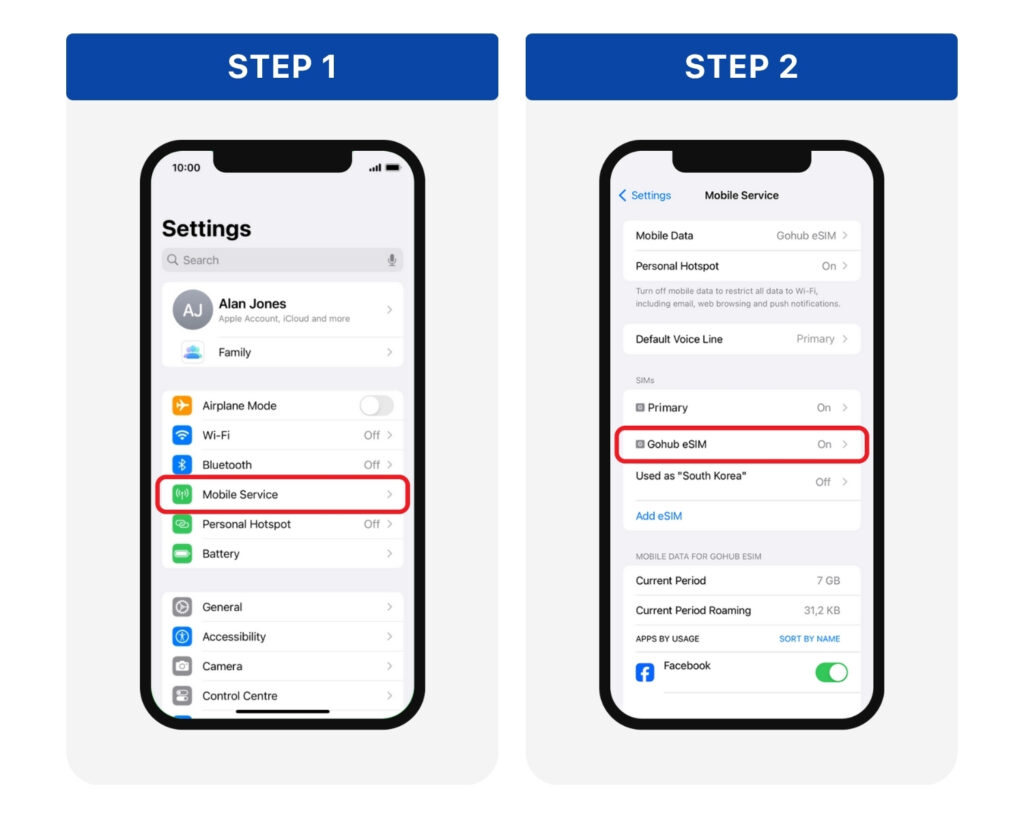
Step 1: Go to Settings > Mobile Service
Step 2: Choose the eSIM/SIM you are currently using from the SIM list
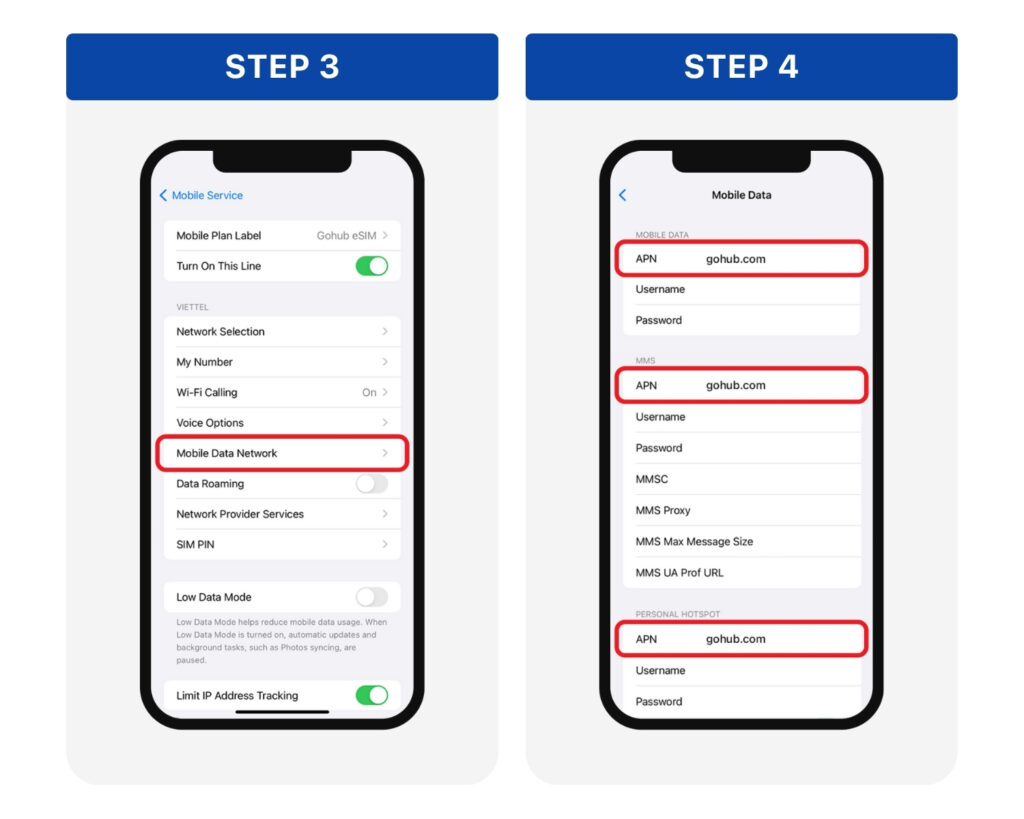
Step 3: Go to Mobile Data Network
Step 4: In 3 APN fields, delete the old information and enter: gohub.com > Tap back to automatically save the changes.
Turn Mobile Data and Data Roaming back on > Then open TikTok or ChatGPT to check the connection.
If TikTok is still not accessible after the APN configuration, please perform the following troubleshooting steps:
Method 1: Uninstall the TikTok app and reinstall it.
Method 2: Log in to TikTok via the mobile web browser first, then return to the app and log in again.
2. For Android #
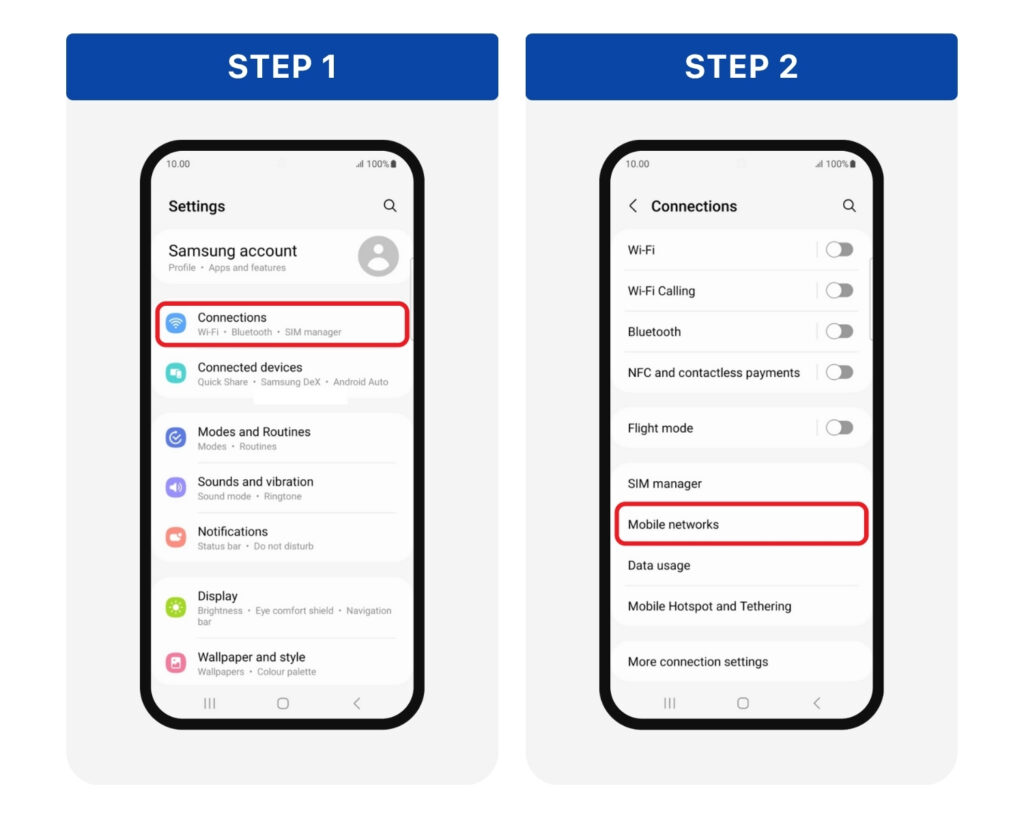
Step 1: Go to Settings > Connections
Step 2: Tap Mobile Networks
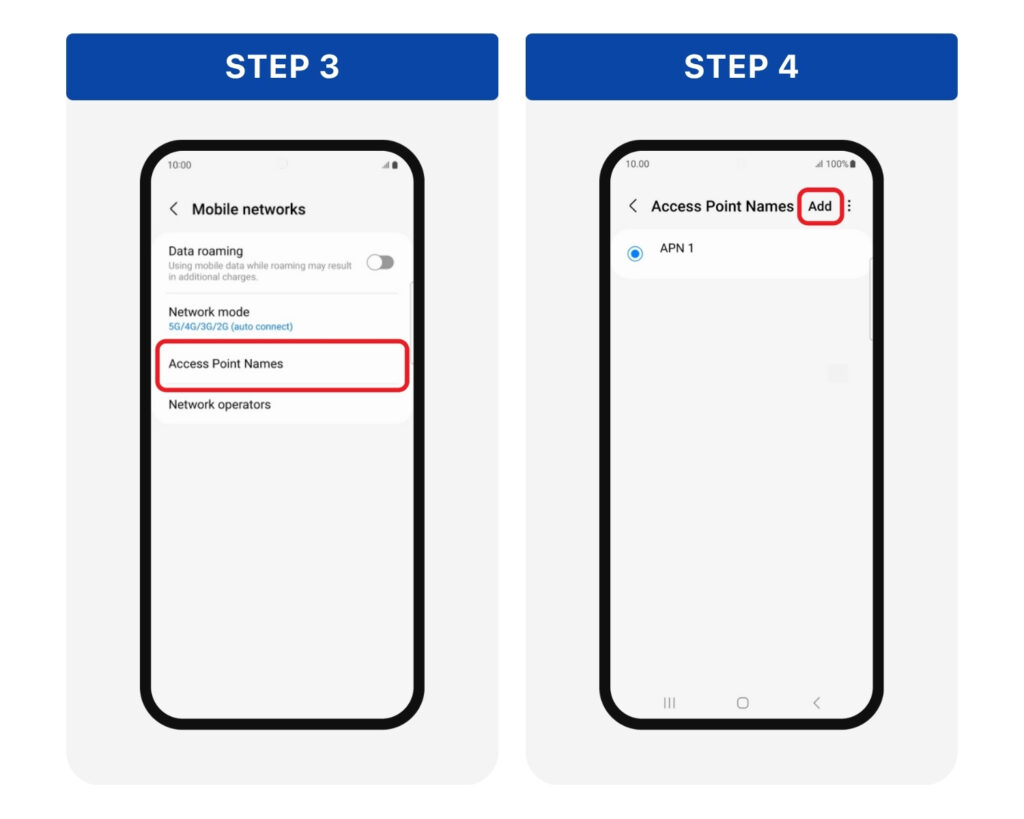
Step 3: Tap Access Point Names
Step 4: Tap the “+” or Add button to create a new APN
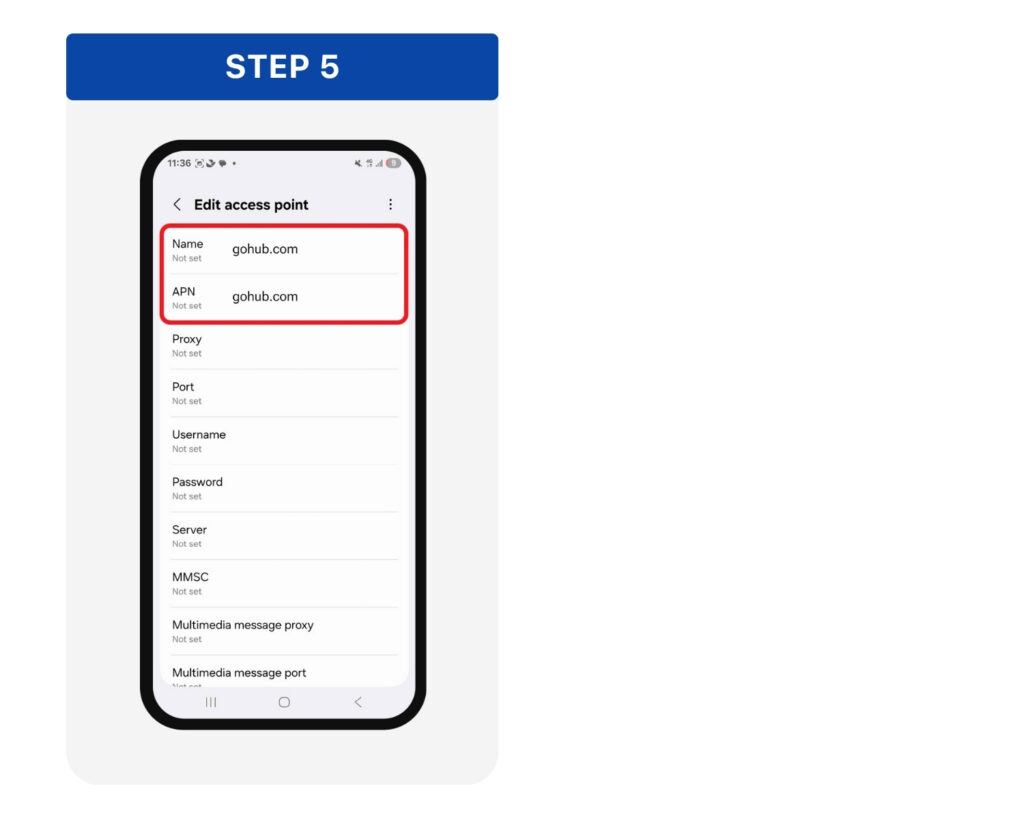
Step 5: Enter gohub.com in both the Name and APN fields > Tap Save or go back > Select the new APN as the default.
Turn Mobile Data and Data Roaming back on > Then open TikTok or ChatGPT to check the connection.
If TikTok is still not accessible after the APN configuration, please perform the following troubleshooting steps:
Method 1: Uninstall the TikTok app and reinstall it.
Method 2: Log in to TikTok via the mobile web browser first, then return to the app and log in again.
HƯỚNG DẪN TIẾNG VIỆT
📌 Lưu ý:
Hướng dẫn này áp dụng cho một số gói SIM/eSIM du lịch quốc tế cần chuyển đổi APN để sử dụng Tiktok, ChatGPT. Vui lòng liên hệ đội ngũ CSKH 24/7 của Gohub qua:
Email: [email protected]
Hotline | Zalo: +84 8 6644 0022
1. Trước khi bay (tại Việt Nam): Hãy đăng xuất tài khoản TikTok của bạn và tắt định vị của ứng dụng này.
2. Khi đã đến quốc gia điểm đến: Sau khi tiến hành cài đặt SIM/ eSIM thành công, bạn tiếp tục các bước thiết lập APN theo hướng dẫn bên dưới rồi đăng nhập lại ứng dụng TikTok
1. Đối với iOS #
Bước 1: Mở Cài đặt (Settings) > Chọn Di động (Mobile Service/Cellular)
Bước 2: Chọn eSIM/SIM quốc tế bạn đang dùng tại danh sách SIM
Bước 3: Chọn mục Mạng dữ liệu di động (Mobile Data Network)
Bước 4: Tại 3 dòng có chữ APN, xóa thông tin cũ và nhập: gohub.com > Nhấn quay lại để tự động lưu thay đổi.
Bật lại Dữ liệu di động > Chuyển vùng dữ liệu > Sau đó mở TikTok hoặc ChatGPT để kiểm tra kết nối.
Nếu bạn vẫn chưa thể sử dụng được TikTok sau khi thiết lập APN, hãy thử các cách sau:
Cách 1: Xóa ứng dụng và cài đặt lại
Cách 2: Đăng nhập TikTok qua trình duyệt web điện thoại trước, rồi quay lại đăng nhập trên ứng dụng.
2. Đối với Android #
Bước 1: Mở Cài đặt (Settings) > Kết nối (Connections)
Bước 2: Chọn Các mạng di động (Mobile Networks)
Bước 3: Nhấn vào Điểm truy cập (Access Point Names)
Bước 4: Chọn dấu “+” hoặc Thêm (Add) để tạo APN mới
Bước 5: Nhập gohub.com tại dòng Tên (Name) và APN > Nhấn Lưu (Save) > Chọn APN mới vừa tạo làm mặc định
Bật lại Dữ liệu di động > Chuyển vùng dữ liệu > Sau đó mở TikTok hoặc ChatGPT để kiểm tra kết nối.
Nếu bạn vẫn chưa thể sử dụng được TikTok sau khi thiết lập APN, hãy thử các cách sau:
Cách 1: Xóa ứng dụng và cài đặt lại
Cách 2: Đăng nhập TikTok qua trình duyệt web điện thoại trước, rồi quay lại đăng nhập trên ứng dụng.