
Skip to content
Gohub
  • About usExpand
    • Careers
    • Blogs
  • GuidesExpand
    • How to install
    • Check compatible device
    • FAQs
Login
Gohub
Login

General eSIM Information

4
  • What is an eSIM?
  • How is eSIM different from traditional SIM?
  • Benefits of eSIMs for Travel
  • How can I get an eSIM?

Device Compatibility

3
  • Checking Your Device’s eSIM Compatibility
  • Carrier Lock: How to Check & Unlock Your Device
  • List of eSIM Compatible Devices

Installation and Setup

3
  • How to Install Your Gohub eSIM
  • When to Install Your Gohub eSIM
  • Important eSIM Information

Using your eSIM

4
  • How do I use eSIMs while traveling?
  • Can I still receive calls and SMS on my primary number?
  • Apps and Services Compatibility
  • Setting up a hotspot

KYC Guide

7
  • KYC Guide – Kango SIM card
  • KYC Guide – Taiwan Joytel SIM card
  • KYC Guide – Taiwan Joytel eSIM
  • KYC Guide – 3HK eSIM
  • KYC Guide – China Unicom SIM card
  • KYC Guide – 3HK SIM card
  • KYC Guide – China Unicom eSIM

Data Management

5
  • How do I know which eSIM is using data?
  • How can I save data usage on my device?
  • Setting Data Limits
  • How can I check how much data I have used?
  • Managing and Extending Your eSIM Plan

Troubleshooting

7
  • Connection Issues
  • eSIM Installation & Activation Issues
  • QR Code & eSIM Profile Issues
  • Device & Carrier Lock Issues
  • Authentication & Plan Errors
  • App & Service Compatibility
  • General eSIM Management Issues

Account & Coupon

2
  • Creating Gohub Account
  • Applying Gohub coupon code

FAQs & Additional Features

1
  • Dual SIM Functionality Explained

Activation Guide

6
  • How to switch APN settings to use TikTok and ChatGPT (Android)
  • How to switch APN settings to use TikTok and ChatGPT (iOS)
  • How to switch APN settings to use TikTok and ChatGPT
  • Activation Guide – T-mobile
  • Activation Guide – Unitel
  • Activation Guide – Mobifone
View Categories
  • Home
  • Documentation
  • Installation and Setup
  • Activation Guide
  • How to switch APN settings to use TikTok and ChatGPT (iOS)

How to switch APN settings to use TikTok and ChatGPT (iOS)

Harley Quinn
Updated on October 7, 2025

1 min read

(Hướng dẫn tiếng Việt bên dưới)

📌 Note
This guide applies to certain international travel SIM/eSIM plans that require APN configuration changes to access TikTok and ChatGPT. For direct assistance, please contact Gohub’s 24/7 Customer Support:
Email: [email protected]
WhatsApp: +1 (302) 899-2888
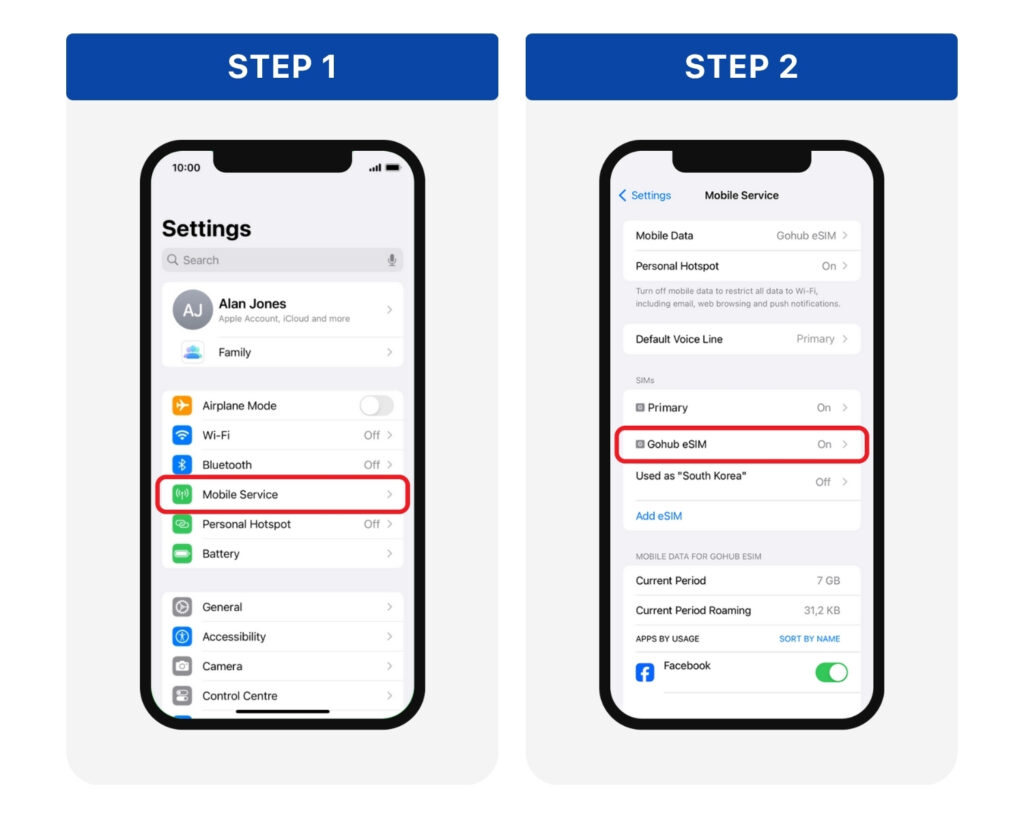
Step 1: Go to Settings > Mobile Service
Step 2: Choose the eSIM/SIM you are currently using from the SIM list
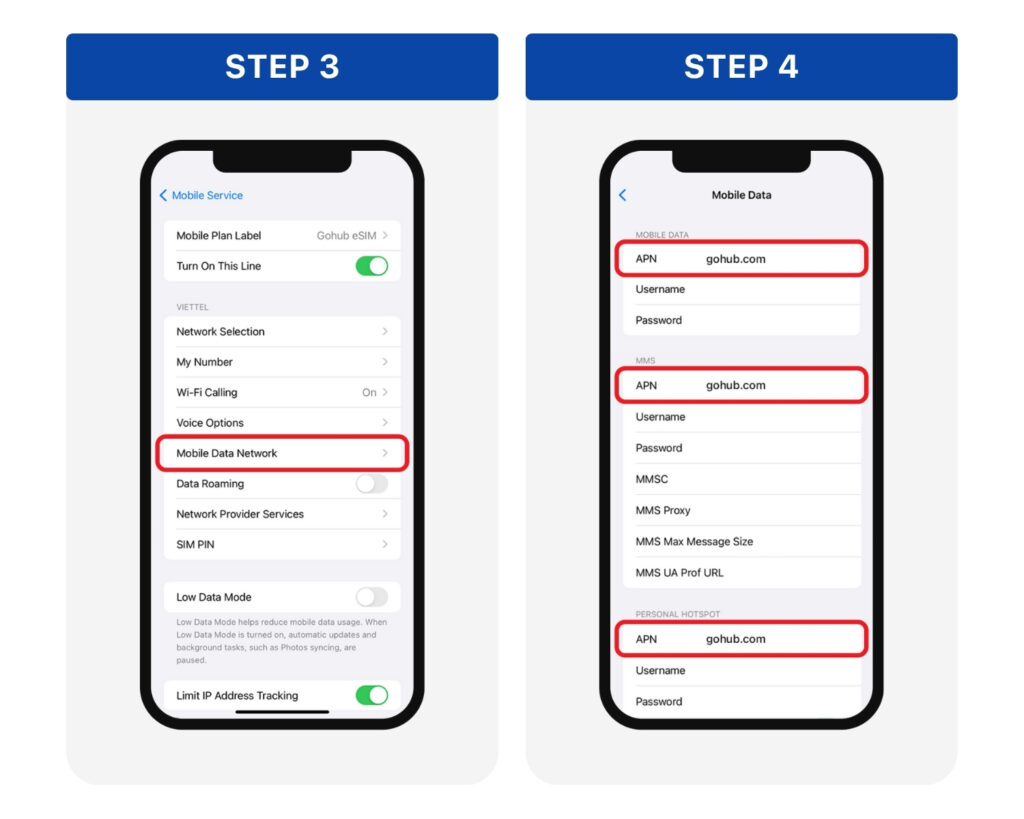
Step 3: Go to Mobile Data Network
Step 4: In 3 APN fields, delete the old information and enter: gohub.com > Tap back to automatically save the changes.

Turn Mobile Data and Data Roaming back on > Then open TikTok or ChatGPT to check the connection.


HƯỚNG DẪN TIẾNG VIỆT

📌 Lưu ý:
Hướng dẫn này áp dụng cho một số gói SIM/eSIM du lịch quốc tế cần chuyển đổi APN để sử dụng Tiktok, ChatGPT. Vui lòng liên hệ đội ngũ CSKH 24/7 của Gohub qua:
Email: [email protected]
Hotline | Zalo: +84 8 6644 0022

Bước 1: Mở Cài đặt (Settings) > Chọn Di động (Mobile Service/Cellular)
Bước 2: Chọn eSIM/SIM quốc tế bạn đang dùng tại danh sách SIM

Bước 3: Chọn mục Mạng dữ liệu di động (Mobile Data Network)
Bước 4: Tại 3 dòng có chữ APN, xóa thông tin cũ và nhập: gohub.com > Nhấn quay lại để tự động lưu thay đổi.

Bật lại Dữ liệu di động > Chuyển vùng dữ liệu > Sau đó mở TikTok hoặc ChatGPT để kiểm tra kết nối.

Updated on October 7, 2025
How to switch APN settings to use TikTok and ChatGPT (Android)How to switch APN settings to use TikTok and ChatGPT

Powered by BetterDocs

Leave a Reply Cancel reply

Your email address will not be published. Required fields are marked *

Share This Article :

  • Facebook
  • X
  • LinkedIn
  • Pinterest

Was it helpful ?

  • Happy
  • Normal
  • Sad
logo-white-2x

254 Chapman Rd, Ste 208 #17565, Newark, Delaware 19702, US

+1 (302) 899-2888 (WhatsApp)

Guides
About Us
Partner with us
Blogs
Privacy Policy
© 2024 Gohub Inc,. All rights reserved. ​
  • About us
    • Careers
    • Blogs
  • Guides
    • How to install
    • Check compatible device
    • FAQs