

What should I do if I can’t delete a Gohub eSIM from my device? #
If you’re having trouble deleting a Gohub eSIM from your device, here’s a breakdown of the steps and what to do if you encounter issues:
1. General Deletion Steps #
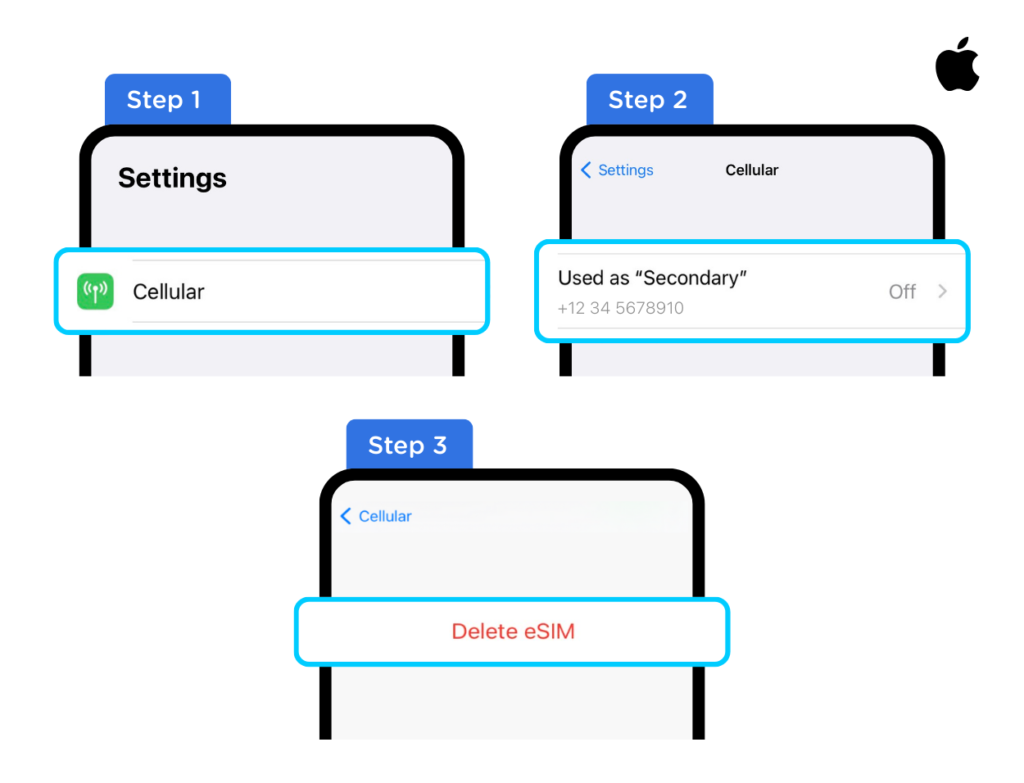
For iOS #
- Go to Settings > Cellular.
- Select the eSIM you want to remove.
- Scroll down and tap “Delete eSIM” or “Delete Cellular Plan.”
For Android #
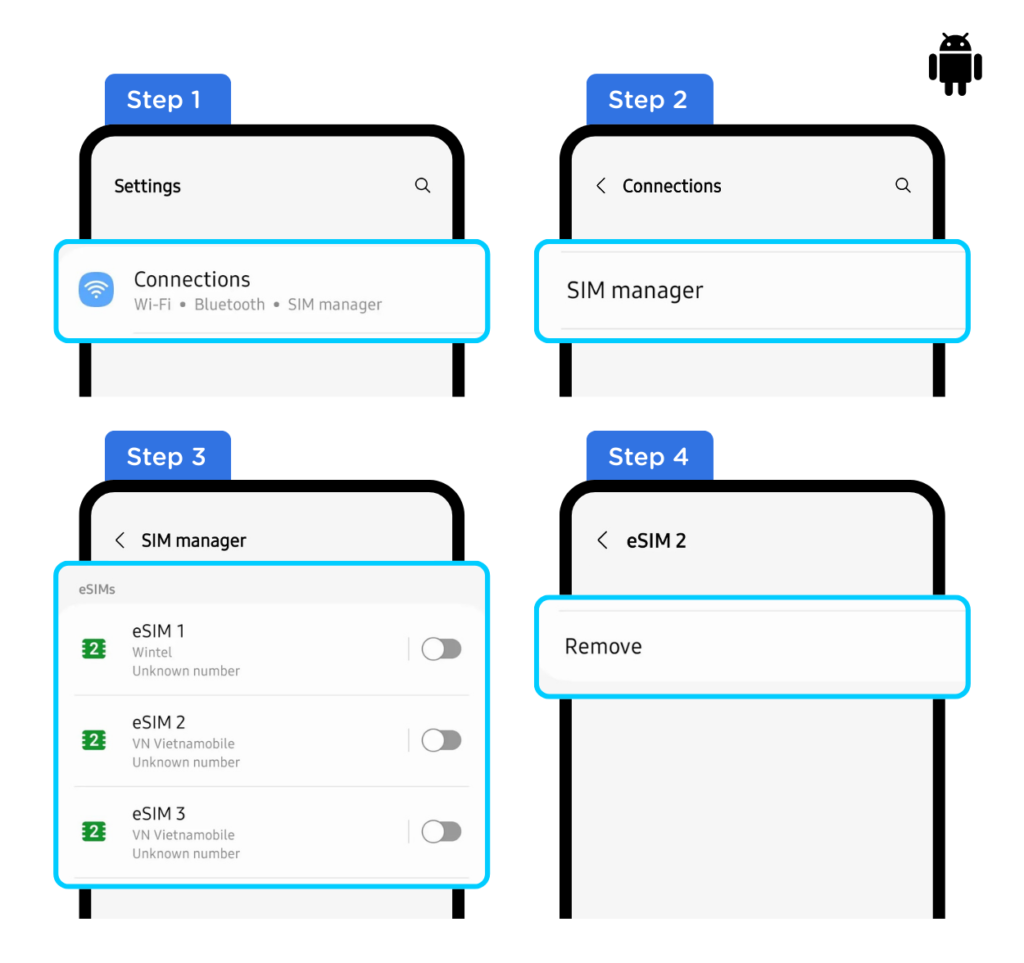
- Go to Settings > Connections.
- Choose “SIM card manager.”
- Select the eSIM you want to remove.
- Select “Remove.”
2. Troubleshooting #
- If the deletion option is grayed out or unavailable:
- Restart your device: A simple restart can often resolve temporary software glitches.
- Check for software updates: Ensure your device’s operating system is up to date. Outdated software can sometimes cause compatibility issues.
- Network issues: Ensure you have a stable network connection, sometimes a network connection is needed for the device to properly communicate with the carrier’s servers.
- If you still cannot delete the eSIM:
- Contact Gohub Customer Support: This is the most important step. They can provide specific assistance and troubleshoot the issue. Here’s how to contact them based on the search results.
- If you have any further questions or concerns, feel free to reach out to our support team at [email protected] or via WhatsApp at +1 (302) 899-2888. Alternatively, you can use this link to quickly access our services: https://wa.me/+13028992888. We’re here to assist you.
- Important Notes from Gohub:
- Gohub notes that once an eSIM is deleted from a device, it cannot be reinstalled.
- They also state that they are unable to assist with the recovery of a deleted eSIM.
- Carrier-Specific Issues: In some rare cases, the carrier that provided the eSIM profile may have to provide assistance.
3. Key Considerations #
- eSIM limitations: Be aware that eSIMs can have limitations, and some actions, like deleting them, can be irreversible.
- Carrier support: If you suspect a carrier-related issue, contacting your mobile carrier’s support may also be helpful.
How do I reset my network settings to resolve eSIM issues? #
1. Troubleshooting #
Resetting your network settings can often resolve connectivity problems, including those related to eSIMs. Here’s how to do it on iOS and Android:
For iOS #
- Go to Settings: Open the Settings app.
- Tap General: Select “General.”
- Scroll Down and Tap Transfer or Reset iPhone/iPad: Select “Transfer or Reset iPhone/iPad”.
- Tap Reset: Select “Reset.”
- Tap Reset Network Settings: Select “Reset Network Settings.”
- Enter Your Passcode: You’ll be prompted to enter your device’s passcode.
- Confirm: Confirm the reset.
For Android #
(Steps may vary slightly by device and Android version)
- Go to Settings: Open the Settings app.
- Tap General Management or System: The exact option may vary.
- Tap Reset or Reset Options: Select “Reset” or “Reset Options.”
- Tap Reset Network Settings or Reset Wi-Fi, mobile & Bluetooth: Select the appropriate option.
- Confirm: Confirm the reset.
2. Why Resetting Network Settings Helps #
This action clears your Wi-Fi passwords, cellular settings, and VPN settings, often resolving conflicts that might be affecting your eSIM. This falls into our CX strategy of providing helpful procedures to enhance your customer journey.